
Chức năng Giấy Chứng Nhận
17 tháng 11, 2025
Tổng quan công nghệ
- Frontend: Angular 20, Canvas API và jsPDF để dựng/ xuất chứng nhận.
- Backend: ASP.NET Core 8.
- Phạm vi: pipeline giấy chứng nhận – từ tạo template, lưu config, cấp phát tới render ở FE.
1. Quy trình tạo Template
| Bước | Nội dung chính |
|---|---|
| 1 | Org gọi POST /api/certificate/samples (multipart) với TenMau, MoTa, MaSuKien, IsDefault và file nền (ảnh/PDF). Ảnh lưu tại wwwroot/uploads. |
| 2 | Sau khi có MaMau, FE editor (certificate-template-editor) upload ảnh mới qua POST /api/upload, rồi lưu layout bằng POST /api/certificate/samples/{maMau}/config. |
| 3 | TemplateConfig dạng JSON fields[], chứa tọa độ, font, màu, key map sang dữ liệu thật (TenTNV, TenSuKien, …). |
TemplateConfig mẫu
json
{
  "fields": [
    {
      "key": "TenTNV",
      "label": "Tên TNV",
      "x": 600,
      "y": 360,
      "fontSize": 48,
      "fontFamily": "Times New Roman",
      "color": "#1d1d1f",
      "align": "center",
      "fontWeight": "bold"
    },
    {
      "key": "TenSuKien",
      "label": "Tên sự kiện",
      "x": 600,
      "y": 460,
      "fontSize": 28,
      "fontFamily": "Roboto",
      "color": "#444444",
      "align": "center",
      "fontWeight": "normal"
    },
    {
      "key": "ThoiGian",
      "label": "Thời gian",
      "x": 600,
      "y": 520,
      "fontSize": 22,
      "fontFamily": "Roboto",
      "color": "#666666",
      "align": "center",
      "fontWeight": "normal"
    }
  ]
}
Editor FE làm gì?
availableFieldsđịnh nghĩa các trường (TenTNV,TenSuKien,TenToChuc, …) + sample data để preview.- Drag & drop thay đổi
x/y, chỉnh font, màu, align; canvas preview dựa vào kích thước ảnh nền để không méo. - Khi lưu, component gửi
{ templateConfig, backgroundImage, width, height }lên API → ghi vào bảngMauGiayChungNhan.
Code:
components/certificate-template-editor/certificate-template-editor.ts.
2. Cấp giấy & snapshot dữ liệu
| Hành động | API | Nghiệp vụ chính |
|---|---|---|
| Cấp đơn lẻ | POST /api/certificate với IssueCertificateDto { maTNV, maSuKien, maMau } | CertificateService.IssueCertificateAsync kiểm tra TNV, sự kiện, mẫu; tạo bản ghi GiayChungNhan, dựng CertificateData từ TemplateConfig + dữ liệu thật (tên TNV, thời gian, số giờ, mã chứng nhận, …). |
| Cấp hàng loạt | POST /api/certificate/events/{maSuKien}/issue-bulk/{maMau} | Lặp qua DonDangKy đã duyệt, bỏ qua TNV đã có chứng nhận. Sau khi insert, gửi thông báo qua NotificationService. |
| Preview/Tải về | GET /api/certificate/{id}/preview hoặc /download?format=image|pdf | CertificateGeneratorService đọc CertificateData, load BackgroundImage, render bằng ImageSharp, export PDF qua QuestPDF. |
Thông tin lưu cùng chứng nhận:
BackgroundImage: tên file trong/wwwroot/uploads.CertificateData: JSON chứa value cho mọi field – bảo toàn ngay cả khi dữ liệu gốc thay đổi.Width/Height: kích thước canvas phục vụ FE và backend.
3. API trả về & mapping field
GET /api/certificate/samples/{maMau}
json
{
  "data": {
    "maMau": 12,
    "tenMau": "Mùa Hè Xanh 2024",
    "backgroundImage": "a8f5-2024.png",
    "templateConfig": "{...}",
    "width": 1920,
    "height": 1080,
    "isDefault": false
  }
}
POST /api/certificate
json
{
  "maGiayChungNhan": 345,
  "maMau": 12,
  "maTNV": 77,
  "tenTNV": "Nguyễn Văn A",
  "maSuKien": 55,
  "tenSuKien": "Chiến dịch Mùa Hè Xanh",
  "tenToChuc": "HSV Việt Nam",
  "ngayCap": "2024-12-01T09:12:00"
}
GET /api/certificate/{id}
json
{
  "data": {
    "maGiayChungNhan": 345,
    "backgroundImage": "a8f5-2024.png",
    "certificateData": "{\"fields\":[{\"key\":\"TenTNV\",\"value\":\"Nguyễn Văn A\",\"x\":600,...}]}",
    "width": 1920,
    "height": 1080
  }
}
Các key khả dụng: TenTNV, TenSuKien, TenToChuc, NgayCap, ThoiGian, DiaChi, MaChungNhan, NgayBatDau, NgayKetThuc.
4. Hiển thị & export FE
CertificateViewerComponent đọc certificateId từ route, gọi GET /api/certificate/{id} rồi vẽ Canvas:
- Parse
certificateData→fields. - Load ảnh nền (
${baseUrl}/uploads/<file>), setcanvasWidth/Height. - Vẽ từng field bằng
ctx.fillText. - Cho phép tải PNG (
canvas.toBlob) và PDF (jsPDF+ chuyển px → mm).
tsx
drawFields(ctx: CanvasRenderingContext2D, fields: TemplateField[]): void {
  fields.forEach(field => {
    if (!field.value) return;
    ctx.font = `${field.fontWeight === 'bold' ? 'bold' : 'normal'} ${field.fontSize}px ${field.fontFamily}`;
    ctx.fillStyle = field.color;
    ctx.textAlign = field.align as CanvasTextAlign;
    ctx.textBaseline = 'top';
    ctx.fillText(field.value, field.x, field.y);
  });
}
Code thực tế: components/certificate-viewer/certificate-viewer.ts (hàm loadCertificate, drawCanvas, downloadImage, downloadPDF).
5. Luồng end-to-end
- Tạo mẫu: upload ảnh + lưu TemplateConfig →
MauGiayChungNhan. - Cấp phát: chọn TNV/sự kiện →
IssueCertificate/bulk → lưu snapshotCertificateData, ảnh nền, kích thước. - Thông báo: gửi push/notification cho TNV.
- Xem & tải: FE gọi
GET /api/certificate/{id}→ vẽ Canvas → user tải PNG/PDF hoặc share link.
6. Database
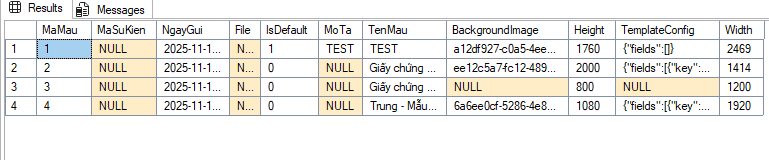
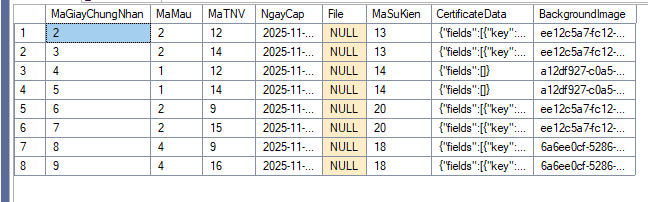
Khi một giấy chứng nhận phát hành, snapshot (CertificateData + BackgroundImage) được lưu cùng record. Việc chỉnh sửa template sau đó không ảnh hưởng các chứng nhận đã cấp.